How to Integrate an AI Humanizer into Your WordPress Publishing Workflow

WordPress is used on over 40% of websites on the internet. So, if you're using a blogging platform, self-hosted website, or even a commerce site, it's almost certainly WordPress. And that means you are most likely using some form of AI writing software to help you produce content faster.
Good news - there is a way around this problem. By implementing an AI humanizer for WordPress that fits seamlessly within the content production pipeline, you can avoid any quality control issues altogether.
In this guide, I'm going to walk you through how these content stacks work, as well as a set of best practices that will help you get the absolute most out of your AI humanizer for WordPress for 2026 and beyond.
Why You Need an AI Humanizer for WordPress
Before we get into the weeds about how to use it, let's talk about why you need an AI humanizer for WordPress in the first place.
Although modern language models like ChatGPT, Claude, and Gemini can churn out an article of 1,000 words in seconds, they aren't without their drawbacks. Namely, it can be quite challenging to get such text past AI detection tools.
That's where the AI humanizer for WordPress comes in. Essentially, these systems rewrite the text generated by ChatGPT, making it appear more natural.
When you add this system to the WordPress publishing pipeline, the combination becomes an extremely powerful content creation tool. It allows you to generate content faster and with fewer quality control issues.
If you're looking to implement this system, here's what a typical content workflow looks like in 2026:
The Perfect Content Production Stack in Modern CMS (With AI Tools)
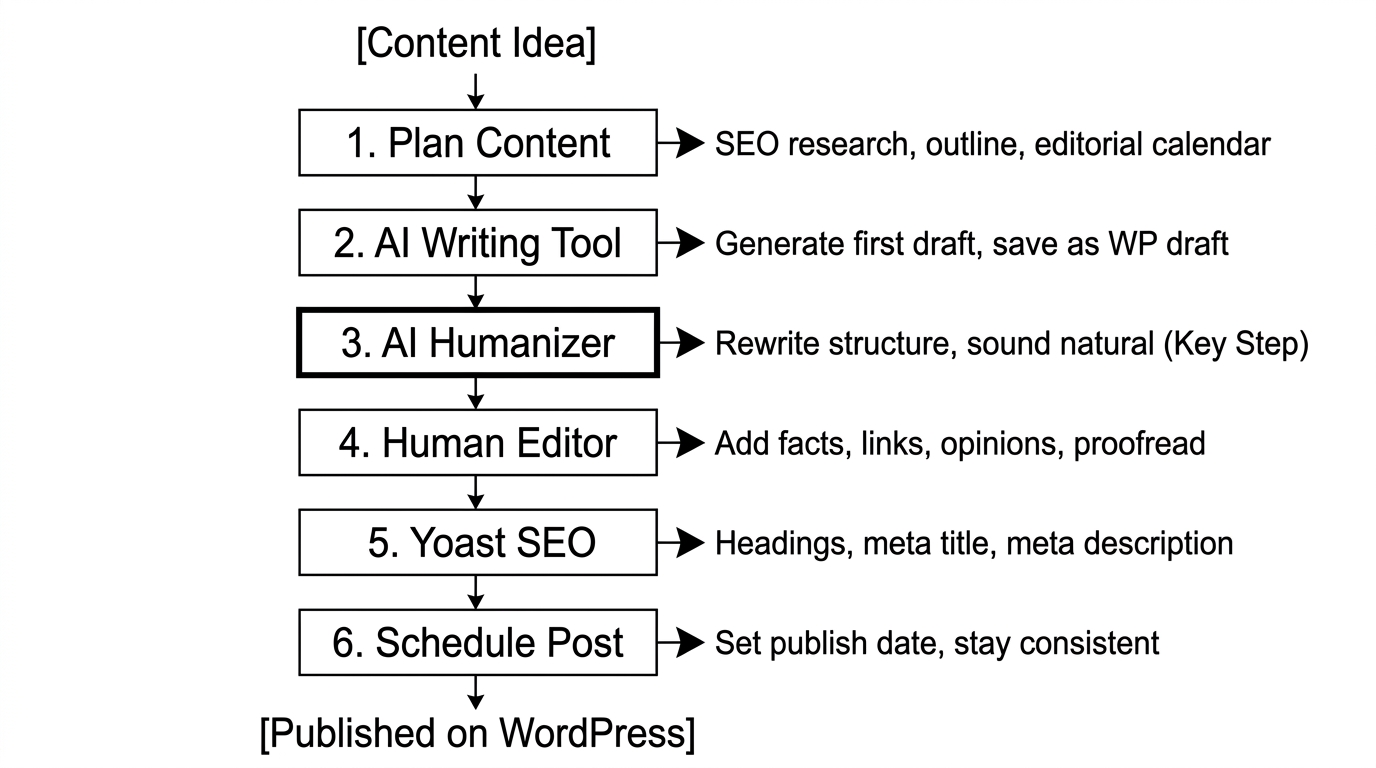
When using an AI humanizer with your WordPress publishing workflow, here are the steps you should use for producing content in 2026:
Step 1: Plan Your Content
This is where planning and research take place. This means putting together any relevant notes, conducting SEO research, outlining your article, and so on.
When working in a team of bloggers, having this information in a shared space like a WordPress editorial calendar is crucial.
Step 2: Use an AI Writing Tool to Generate Content
This is where you put your outline and notes into an AI content generation tool. This isn't a substitute for actually writing, but it does help you write much faster.
If you're using WordPress as your CMS, make sure to save this work somewhere in the WordPress content pipeline, like a text file or a draft post within WordPress itself.
Step 3: Use an AI Humanizer for Rewriting Your Text (This is the Key Step!)
This step is often overlooked by small businesses and individual bloggers, but it is essential for quality control. As mentioned above, language models such as ChatGPT can "expose" your text to AI detection tools at this stage of the production line.
The best practice here is to feed this raw text from an AI tool to an AI humanizer for rewriting text.
A good AI humanizer will alter sentence structure and introduce other changes that make the rewritten text more natural-sounding. This is usually enough to fool most online AI detectors, saving you time and money.
For rewriting, you may want to use AI humanizer tools with a high limit on characters per request for bulk rewriting of multiple articles at once.
Finally, make sure that the humanized text has a similar feel and structure to the remainder of your content.
Step 4: Have a Human Editor Make Final Edits to Your Content
Although this may seem like an extra step, it's crucial for ensuring quality control and getting the most out of your free WordPress blog workflow. This is the ideal time for introducing any other notes, comments, or changes you want made to the text.
I strongly suggest adding in any additional facts, figures, and other information of value. This could include linking to related resources, adding in images, and including your own thoughts and opinions.
Finally, don't forget to run a final proofreading on the text for grammatical errors and typos.
Step 5: Run Through Yoast SEO and Similar Plugins - Formatting Your Content
This is where the content is formatted and made ready for publishing. Using Yoast SEO or another similar tool, make sure to add appropriate subheadings and sections to your article.
It's also important to make tweaks to the meta description, title, and so on according to Yoast SEO guidelines. For those who are still using WordPress for small business and want better rankings on Google, pay special attention to this part of the process.
Step 6: Set Date for Content to Be Published (Blog Post Scheduling)
The very last step is to set a date for the blog post to be published or appear on your website. This way, you can publish content on a regular basis with minimal fuss, which is crucial for building and maintaining a following.
If you've been wondering how to boost your web traffic, this is an excellent way to increase your blog content volume.

How to Build an AI Plugin Stack for WordPress
Depending on your needs, your content production stack might need to include various plugins as well. This way, you can build out a comprehensive system that covers all aspects of the content creation process.
Essentially, your AI-assisted content production stack should contain the following:
- A Tool for Generating AI-Assisted Content: This could be something like ChatGPT, Claude, Gemini, or Jasper AI - it doesn't matter which one you use, so long as it gets the job done. In general, you should focus on tools with excellent support for long-tail keywords and overall content volume.
- An AI Humanizer Tool: As we discussed above, this is a crucial addition to any CMS content pipeline for quality control. Most humanizer tools have bulk rewriting features, API access, and other useful tools.
- SEO Optimization Feature: Although some might argue that this step isn't necessary in this content pipeline, it's actually quite important. Thanks to recent updates, Yoast SEO AI content features like AI content optimization have become much more useful.
- An Editorial Calendar Tool for WordPress: A content calendar in WordPress is important for making sure that everything is published in a timely fashion. Fortunately, several free and paid WordPress plug-ins can help you manage this essential task.
How to Fully Automate the Workflow with AI Tools
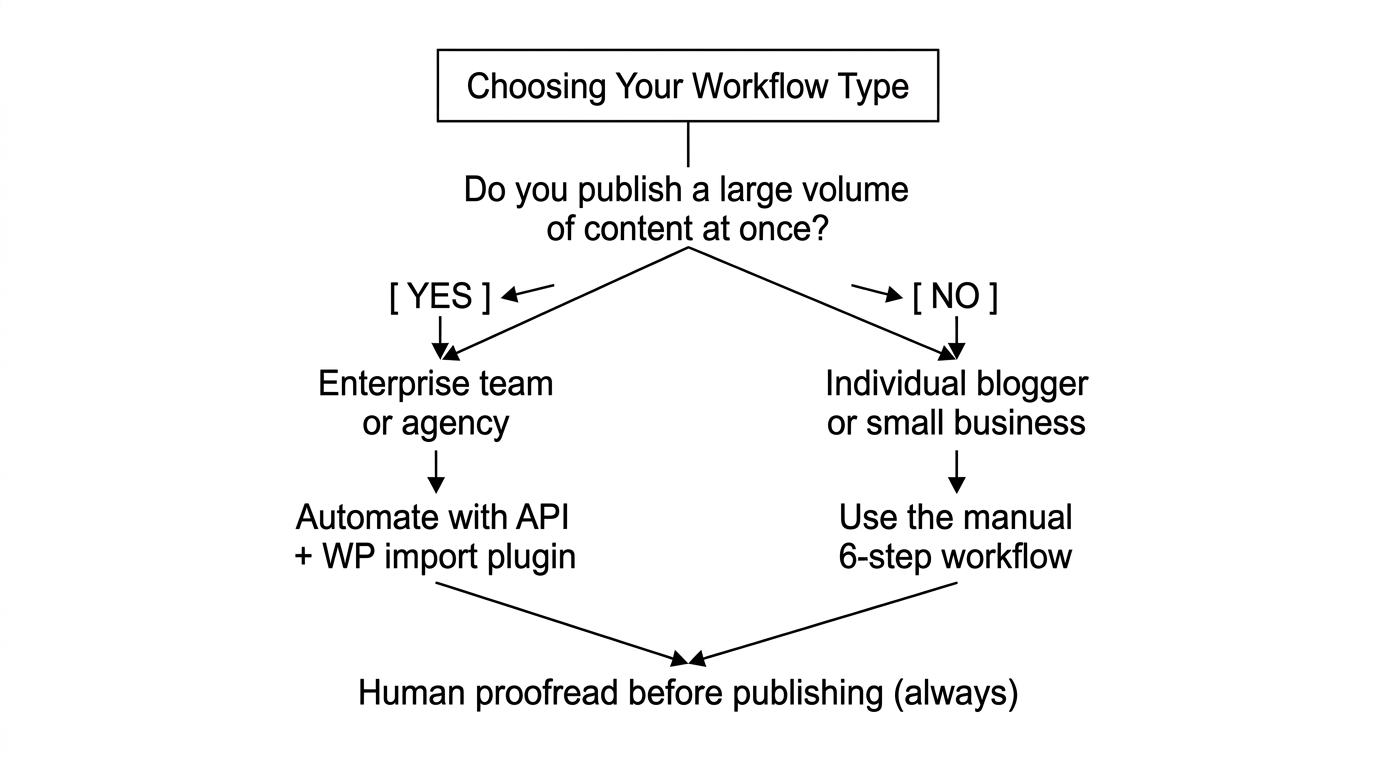
Finally, for organizations that need to produce a lot of content at once, you might want to look into AI content automation tools. This way, your AI humanizer for WordPress can fully integrate with the rest of your business software. To do this, follow these steps:
Step 1: Use AI Writing Tools to Generate Your First Draft of Content
You might want to use AI tools to generate your first draft of content automatically by using predefined sets of instructions.
Step 2: Use an API to Send this Draft to an AI Humanizer
Next, use an API to send this draft to an AI humanizer for rewriting text. You must choose a system that operates at the enterprise level, as such systems allow for much greater volumes of text to be processed.
This system should ideally be fully compatible with existing tools in your tech stack. Tools like Undetectable AI offer such API access for businesses in 2026.
Step 3: Import This Into WordPress Using a WP Import Plugin
From here, it's a matter of importing this into WordPress using a WP import plugin, making any final edits, and publishing the article. If using such a pipeline is a bit much for your small blog writing needs, feel free to simplify this process however you'd like. As a rule of thumb, remember to always have a human proofreader examine any AI-assisted text before publishing.
Remember - the faster and higher quality content you produce, the better your chances are for increasing web traffic and improving your presence on Google.
4 Most Common Mistakes When Using an AI Humanizer for WordPress
While these are all excellent ways to improve your publishing workflow, there are some common mistakes that newer bloggers and small business owners make when using these tools.
- Mistake #1: Not Reviewing AI-Assisted Text Carefully Enough: Although most humanized text won't have serious issues, there are some cases where human review is required to spot errors that an AI detector might miss. That's why it's important to always have a human proofreader examine any AI-assisted text before publishing.
- Mistake #2: Not Paying Close Enough Attention to the Humanization Process: Because so many small bloggers are looking to boost their web traffic, it can be tempting to automate as much of this as possible. While this may be an excellent strategy for enterprise blogging, it's not recommended for individual blogging. In both cases, make sure to always examine any AI-assisted text for accuracy, errors, and other issues before publishing.
- Mistake #3: Failing to Leverage SEO Tools Like Yoast SEO: While humanizing text is important, it's just as important to make sure that it passes AI detection tools. One of the best ways to do this while simultaneously improving your search engine rankings is to use a tool like Yoast SEO.
- Mistake #4: Inconsistent Brand Voice with Different Tools: Depending on which tools you use in the content pipeline, you risk ending up with substantially different brand voices. Because brand voice is so important for both search engine optimization and customer engagement, make sure that brand voice is always consistent across all stages of content production. In general, this means always using the same tools at every stage in the production pipeline.
How to Measure ROI on an AI Humanizer for WordPress in 2026
Now that we've covered the fundamentals about integrating an AI humanizer for WordPress into the content production pipeline, let's take a look at how to measure ROI on such an investment.
Here are a few metrics that individual bloggers and content-heavy businesses can use to measure performance:
- AI Detection Score for Published Posts: As mentioned earlier, one of the primary advantages of using an AI humanizer is to be able to pass AI detection scores. That makes it worthwhile to examine how your detection scores change over time.
- Search Engine Rankings for Published Articles: Again, one of the main advantages of using an AI humanizer for a WordPress blog is to ensure that Google recognizes your content as high quality. This has the bonus of improving overall visibility in search results.
- General Engagement and Web Traffic: While your published content will likely drive traffic to your website, the question is whether or not this traffic engages with your articles. In other words, are visitors spending enough time on these pages? Are they finding the content useful?
- Quantity of New Content Published Each Month: For individual bloggers and small businesses, this can be a crucial metric for determining overall productivity. Larger enterprises should also examine this metric for signs of improvement in productivity.
Best Practices for AI Writing Tools in 2026
When it comes to best practices for AI writing tools, there are a few rules of thumb that apply to everyone, no matter their size or scale of operation.
First and foremost, documentation is crucial. Having a shared knowledge base outlining standard operating procedures is vital for team collaboration. This knowledge base should specifically address your content production stack and what each tool within it is used for.
Beyond that, make sure to regularly update your tools and familiarize yourself with any changes in the technological landscape. This way, you are always aware of potential improvements that you can make to your WordPress blog workflow stack.
For larger teams, this probably means creating standardized training materials for everyone who contributes to the content production process. Again, the higher the quality of output you get from these AI tools, the better.
Finally, remember to always maintain exceptionally high standards in your content, no matter what tools you use. After all, nobody wants to read an AI-assisted article that was published without any form of human review.
That wraps up this guide about how to implement an AI humanizer for WordPress! By following these guidelines, you're well on your way to dominating the content production space in 2026. If you want even more guidance about how to increase your web traffic or build a stronger presence on Google, make sure to continue exploring the blog.